
Download 2X SecureRDP – Free RDP Session Control, IP Filtering & Secure Remote Desktop
Overview
2X SecureRDP is a lightweight, free Windows utility that empowers administrators to manage Remote Desktop Protocol (RDP) connections with granular control. Designed for environments that still rely on legacy Windows platforms such as Windows 2000 and earlier, the software offers a simple yet powerful interface to accept or deny RDP sessions based on IP address, computer name, or custom criteria. Since its introduction in 2005, 2X SecureRDP has attracted more than 1,600 downloads worldwide, with notable popularity in Bangladesh, Israel, and India.
The current version 4.0, released on 12 February 2005, remains a solid choice for organizations that need an additional security layer without the overhead of modern enterprise firewalls. Because the tool is part of the “Networking – Analysis – Monitoring” category, it focuses on real‑time session inspection rather than long‑term data aggregation, making it ideal for small to medium IT teams that require instant decision‑making for remote connections. Its minimal storage footprint and zero‑cost licensing mean that even legacy hardware can run the program without performance penalties.
Whether you are a system administrator protecting a single server or a network manager overseeing dozens of terminal services, 2X SecureRDP delivers an intuitive way to enforce connection policies, reduce unauthorized access, and keep audit trails simple and clear.
Key Features
- IP‑Based Filtering: Create white‑list or black‑list rules to automatically allow or block RDP attempts from specific network ranges.
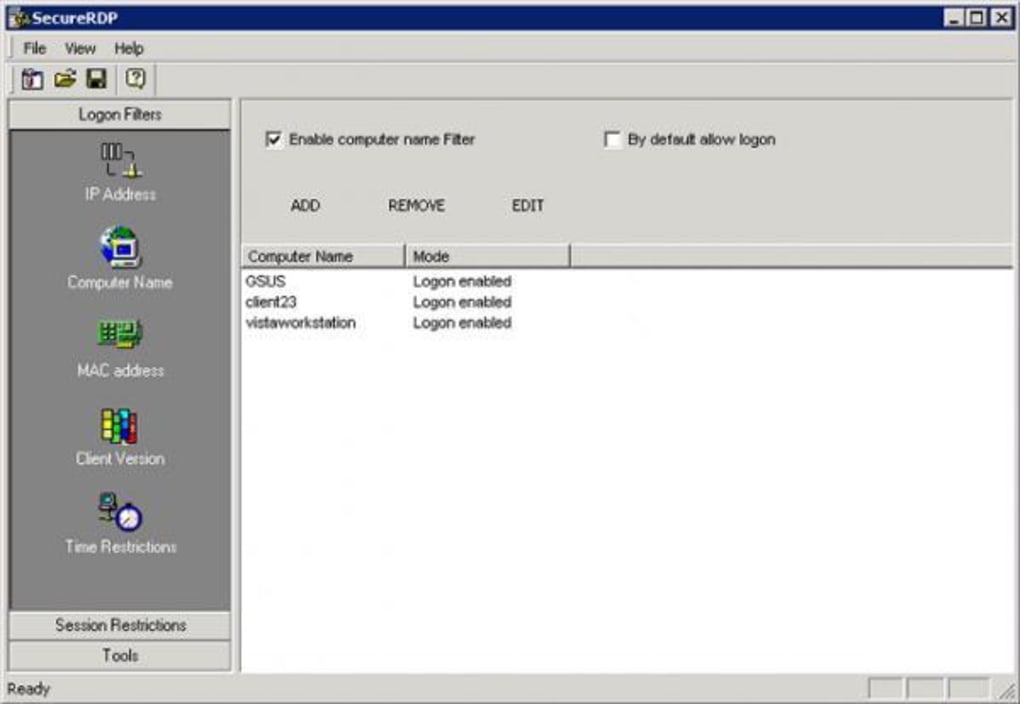
- Computer‑Name Validation: Match incoming session requests against predefined PC names, helping to prevent spoofed connections.
- Real‑Time Alerts: Pop‑up notifications appear whenever a session is accepted or denied, giving administrators instant feedback.
- Logging & Reporting: Every decision is written to a log file, which can be reviewed for compliance or forensic analysis.
- Lightweight Architecture: The installer occupies less than 2 MB of disk space and runs silently in the background with minimal CPU usage.
- Custom Rule Engine: Combine multiple criteria (IP + computer name) in a single rule for sophisticated access control.
- Free & Open Distribution: No licensing fees, no hidden costs, and the program is distributed in English only.
- Legacy OS Support: Fully compatible with Windows 2000 and earlier versions, extending security to older infrastructure.
Installation & Usage Guide
Installing 2X SecureRDP is straightforward and can be completed in just a few minutes. First, download the installer from the official distribution page. Because the software is unsigned, Windows may prompt you to confirm that you trust the source; simply click “Run” and accept the User Account Control (UAC) request. The wizard guides you through a typical “Next‑Next‑Finish” process, offering the option to create a desktop shortcut for quick access to the configuration console.
Once installed, launch the application. The main window presents three tabs: Rules, Log, and Settings. In the Rules tab, click “Add New Rule” and select the criteria you wish to enforce – for example, “Allow only IP addresses in the 192.168.1.0/24 range”.
You can also specify a computer name pattern using wildcards (e.g., “SERVER‑*”). After defining the rule, choose the action (Accept or Deny) and click “Save”. The rule list updates immediately, and the engine starts monitoring incoming RDP requests.
To view activity, switch to the Log tab where each connection attempt is timestamped, showing the source IP, target machine, and the rule that triggered the decision. For administrators who prefer centralized management, the Settings tab offers options to start the service automatically at boot, configure log file rotation, and enable or disable real‑time alerts. The interface is deliberately simple: no scripting or PowerShell is required, making it accessible to technicians who may not have deep programming experience.
Should you need to uninstall, the standard Windows “Add or Remove Programs” utility will cleanly remove 2X SecureRDP, leaving no residual registry entries. Because the program stores its configuration in a plain‑text XML file, you can back up the file before removal and restore it on another machine if you wish to replicate the same security policy across multiple servers.
Compatibility, Pros & Cons
2X SecureRDP is built for legacy Windows platforms and officially supports Windows 2000, Windows NT 4.0, and earlier releases. While it runs on newer versions of Windows (XP, Vista, 7) in compatibility mode, the primary target audience remains organizations that still maintain older terminal servers for legacy applications. The software is distributed only in English, which may require translation for non‑English speaking teams, but the graphical interface is intuitive enough that language barriers are minimal.
Pros
- Free to download and use, with no hidden licensing fees.
- Very small footprint – ideal for servers with limited storage.
- Granular control over RDP sessions using IP and computer‑name filters.
- Instant alerts keep administrators aware of connection activity.
- Comprehensive log files aid compliance and forensic investigations.
- Works on very old Windows versions that many modern security tools have dropped.
Cons
- Only available in English; no localization for other languages.
- Interface looks dated compared to contemporary Windows 10/11 utilities.
- Limited to Windows platforms – no macOS, Linux, or mobile support.
- Last update was in 2005, so no official patches for newer security vulnerabilities.
- Lacks advanced features such as multi‑factor authentication integration.
Review Summary: 2X SecureRDP remains a solid, no‑cost solution for legacy Windows environments that need quick RDP session filtering. Its simplicity is both a strength and a limitation; while it excels at basic IP‑based blocking, organizations requiring modern authentication methods should consider complementary tools. Overall rating: 4 out of 5 stars.
FAQ & Final Verdict
Is 2X SecureRDP compatible with Windows Server 2003?
Yes. Although the official documentation lists Windows 2000 and earlier, the application runs without issues on Windows Server 2003 when installed in compatibility mode.
Can I export the rule set for use on another server?
Absolutely. All rules are stored in an XML configuration file located in the installation directory. You can copy this file to another machine and the program will load the same policies automatically.
Does 2X SecureRDP provide any encryption for the logs?
The log files are plain text by default. If encryption is required, you can place the log folder on an encrypted drive or use Windows EFS to protect the files.
Will the tool interfere with Windows Firewall rules?
No. 2X SecureRDP works at the application level, examining incoming RDP traffic after the firewall has allowed it. It does not modify firewall configurations.
Is there a way to receive email notifications for denied connections?
The native version does not include email alerts, but you can use a simple script that monitors the log file and triggers an SMTP send when a “Denied” entry appears.
Conclusion & Call to Action: For businesses that still operate on older Windows servers, 2X SecureRDP delivers a no‑cost, easy‑to‑deploy layer of security that fills the gap left by modern firewalls. Its IP‑ and computer‑name filtering, real‑time alerts, and compact footprint make it an attractive addition to any legacy terminal services environment. While the interface may look dated and the feature set is intentionally basic, the core functionality remains reliable and valuable. If you need to tighten RDP access without investing in expensive enterprise solutions, download 2X SecureRDP today, configure a few simple rules, and start protecting your remote sessions immediately.







